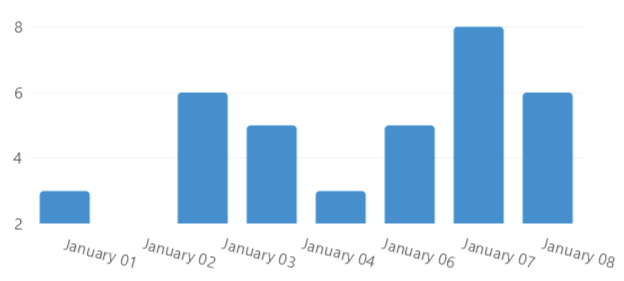
Date Time Scale
This sample uses C# 13 preview features such as partial properties, it also uses features from the CommunityToolkit.Mvvm package, you can learn more about it here.
This web site wraps every sample using a UserControl instance, but LiveCharts controls can be used inside any container.
View model
using System;
using LiveChartsCore.Defaults;

namespace ViewModelsSamples.Axes.DateTimeScaled;

public class ViewModel
{
    public DateTimePoint[] Values { get; set; } = [
        new() { DateTime = new(2021, 1, 1), Value = 3 },
        new() { DateTime = new(2021, 1, 2), Value = 6 },
        new() { DateTime = new(2021, 1, 3), Value = 5 },
        new() { DateTime = new(2021, 1, 4), Value = 3 },
        new() { DateTime = new(2021, 1, 5), Value = 5 },
        new() { DateTime = new(2021, 1, 6), Value = 8 },
        new() { DateTime = new(2021, 1, 7), Value = 6 }
    ];

    public Func<DateTime, string> Formatter { get; set; } =
        date => date.ToString("MMMM dd");
}
XAML
<UserControl
    x:Class="AvaloniaSample.Axes.DateTimeScaled.View"
    xmlns="https://github.com/avaloniaui"
    xmlns:x="http://schemas.microsoft.com/winfx/2006/xaml"
    xmlns:lvc="using:LiveChartsCore.SkiaSharpView.Avalonia"
    xmlns:vms="using:ViewModelsSamples.Axes.DateTimeScaled"
    x:DataType="vms:ViewModel">

    <UserControl.DataContext>
        <vms:ViewModel/>
    </UserControl.DataContext>

    <lvc:CartesianChart>

        <lvc:CartesianChart.Series>
            <lvc:XamlColumnSeries Values="{Binding Values}"/>
        </lvc:CartesianChart.Series>

        <!--
            The Interval property is used to set the interval between each label,
            in this case, the interval is set to 1 day.

            In the DateFormatter property, we define the format of the labels.
        -->

        <lvc:CartesianChart.XAxes>
            <lvc:XamlDateTimeAxis
                Interval="1.00:00:00"
                DateFormatter="{Binding Formatter}"/>
        </lvc:CartesianChart.XAxes>

    </lvc:CartesianChart>
</UserControl>
