Line Smoothness
This sample uses C# 13 preview features such as partial properties, it also uses features from the CommunityToolkit.Mvvm package, you can learn more about it here.
This web site wraps every sample using a UserControl instance, but LiveCharts controls can be used inside any container.
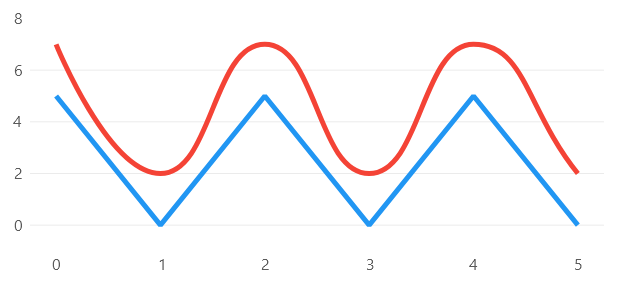
View model
namespace ViewModelsSamples.Lines.Straight;

public class ViewModel
{
    public double[] Values1 { get; set; } =
        [5, 0, 5, 0, 5, 0];

    public double[] Values2 { get; set; } =
        [7, 2, 7, 2, 7, 2];
}
XAML
<UserControl
    x:Class="WPFSample.Lines.Straight.View"
    xmlns="http://schemas.microsoft.com/winfx/2006/xaml/presentation"
    xmlns:x="http://schemas.microsoft.com/winfx/2006/xaml"
    xmlns:lvc="clr-namespace:LiveChartsCore.SkiaSharpView.WPF;assembly=LiveChartsCore.SkiaSharpView.WPF"
    xmlns:vms="clr-namespace:ViewModelsSamples.Lines.Straight;assembly=ViewModelsSamples">

    <UserControl.DataContext>
        <vms:ViewModel/>
    </UserControl.DataContext>

    <!--
    The line smoothness property controls the curve between points
    it goes from 0 to 1, where 0 is straight and 1 is the most curved.
    -->

    <lvc:CartesianChart>
        <lvc:CartesianChart.Series>
            <lvc:SeriesCollection>
                <lvc:XamlLineSeries
                    Values="{Binding Values1}"
                    Fill="{x:Null}"
                    GeometrySize="0"
                    LineSmoothness="0"/>
                <lvc:XamlLineSeries
                    Values="{Binding Values2}"
                    Fill="{x:Null}"
                    GeometrySize="0"
                    LineSmoothness="1"/>
            </lvc:SeriesCollection>
        </lvc:CartesianChart.Series>
    </lvc:CartesianChart>

</UserControl>
