Row Series
This web site builds the control from code behind but you could also grab it from the toolbox, this sample also uses a ViewModel to populate the properties of the control(s) in this sample.
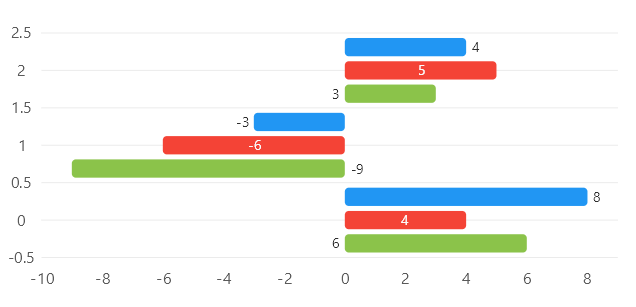
Code behind
using System.Windows.Forms;
using LiveChartsCore;
using LiveChartsCore.SkiaSharpView;
using LiveChartsCore.SkiaSharpView.WinForms;

namespace WinFormsSample.Bars.RowsWithLabels;

public partial class View : UserControl
{
    public View()
    {
        InitializeComponent();
        Size = new System.Drawing.Size(50, 50);

        var values1 = new int[] { 8, -3, 4 };
        var values2 = new int[] { 4, -6, 5 };
        var values3 = new int[] { 6, -9, 3 };

        var series = new ISeries[]
        {
            new RowSeries<int>
            {
                Values = values1,
                DataLabelsPosition = LiveChartsCore.Measure.DataLabelsPosition.End,
                DataLabelsSize = 14,
                ShowDataLabels = true
            },
            new RowSeries<int>
            {
                Values = values2,
                DataLabelsPosition = LiveChartsCore.Measure.DataLabelsPosition.Middle,
                DataLabelsSize = 14,
                ShowDataLabels = true
            },
            new RowSeries<int>
            {
                Values = values3,
                DataLabelsPosition = LiveChartsCore.Measure.DataLabelsPosition.Start,
                DataLabelsSize = 14,
                ShowDataLabels = true
            }
        };

        var cartesianChart = new CartesianChart
        {
            Series = series,
            Location = new System.Drawing.Point(0, 0),
            Size = new System.Drawing.Size(50, 50),
            Anchor = AnchorStyles.Left | AnchorStyles.Right | AnchorStyles.Top | AnchorStyles.Bottom
        };

        Controls.Add(cartesianChart);
    }
}
