Conditional Draw
This sample uses C# 13 preview features such as partial properties, it also uses features from the CommunityToolkit.Mvvm package, you can learn more about it here.
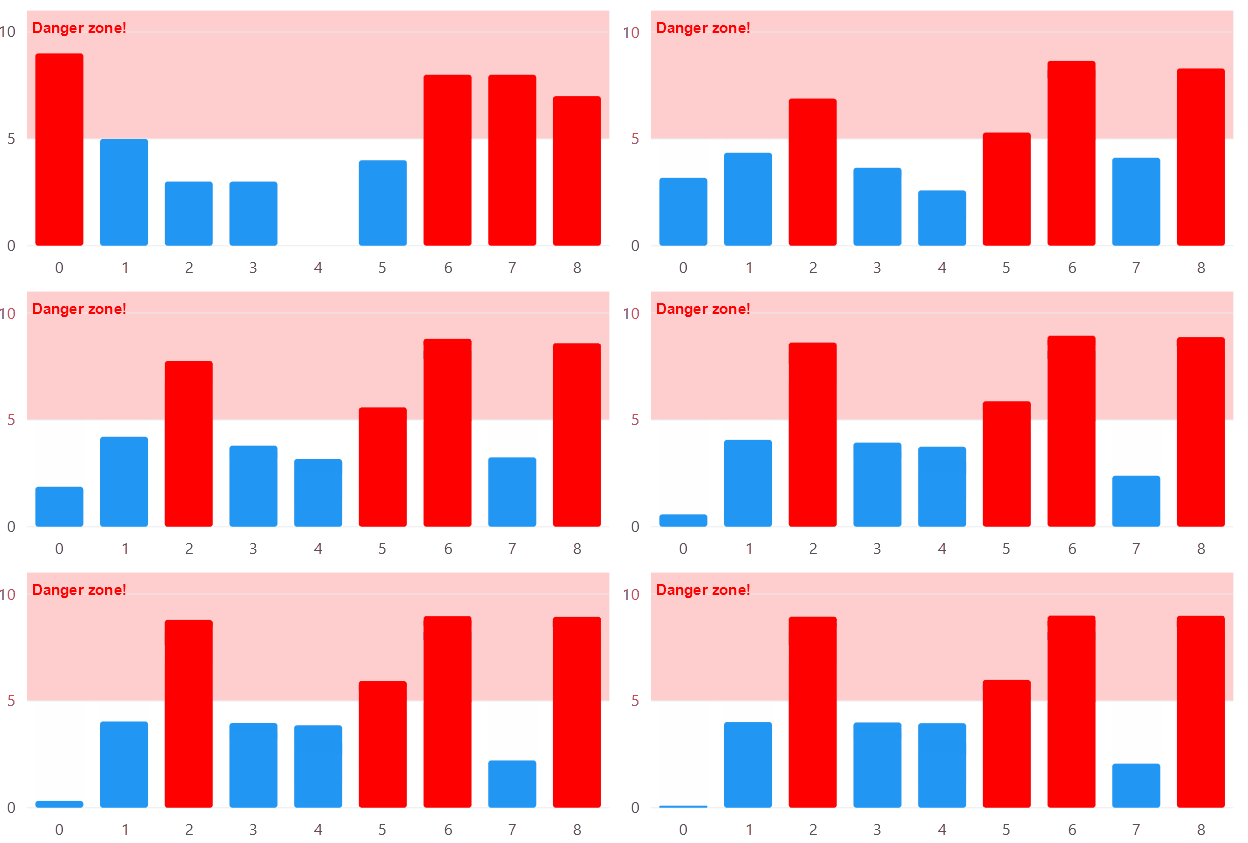
View model
using System;
using System.Collections.ObjectModel;
using LiveChartsCore.Defaults;
using CommunityToolkit.Mvvm.Input;
using LiveChartsCore.Kernel;
using System.Threading.Tasks;

namespace ViewModelsSamples.General.ConditionalDraw;

public partial class ViewModel
{
    public ViewModel()
    {
        Randomize();
    }

    public ObservableCollection<ObservableValue> Values { get; set; } =
        [
            new(2),
            new(3),
            new(4)
        ];

    [RelayCommand]
    private void OnPointMeasured(ChartPoint point)
    {
        var ctx = point.Context;
        if (ctx.DataSource is not ObservableValue observable) return;

        var states = ctx.Series.VisualStates;

        if (observable.Value > 5)
        {
            states.SetState("Danger", ctx.Visual);
            states.SetState("LabelDanger", ctx.Label);
        }
        else
        {
            states.ClearState("Danger", ctx.Visual);
            states.ClearState("LabelDanger", ctx.Label);
        }
    }

    private async void Randomize()
    {
        var r = new Random();

        while (true)
        {
            await Task.Delay(3000);

            foreach (var item in Values)
            {
                item.Value = r.Next(0, 10);
            }
        }
    }
}
XAML
<UserControl
    x:Class="AvaloniaSample.General.ConditionalDraw.View"
    xmlns="https://github.com/avaloniaui"
    xmlns:x="http://schemas.microsoft.com/winfx/2006/xaml"
    xmlns:lvc="using:LiveChartsCore.SkiaSharpView.Avalonia"
    xmlns:vms="using:ViewModelsSamples.General.ConditionalDraw"
    x:DataType="vms:ViewModel">

    <UserControl.DataContext>
        <vms:ViewModel/>
    </UserControl.DataContext>

    <lvc:CartesianChart TooltipPosition="Bottom">

        <lvc:CartesianChart.Series>
            <lvc:XamlColumnSeries
                ShowDataLabels="True"
                DataLabelsSize="15"
                Values="{Binding Values}"
                PointMeasuredCommand="{Binding PointMeasuredCommand}">

                <!--
                Use the AdditionalVisualStates property to define the look of the points
                when they are in a different state
                -->

                <lvc:XamlColumnSeries.AdditionalVisualStates>

                    <!-- When the state is "Danger", the Fill is set to red -->
                    <lvc:ChartPointState Name="Danger">
                        <lvc:ChartPointState.Setters>
                            <lvc:Set
                                PropertyName="Fill"
                                Value="{lvc:SolidColorPaint Color='#f00'}"/>
                        </lvc:ChartPointState.Setters>
                    </lvc:ChartPointState>

                    <lvc:ChartPointState Name="LabelDanger">
                        <lvc:ChartPointState.Setters>
                            <lvc:Set
                                PropertyName="Paint"
                                Value="{lvc:SolidColorPaint Color='#f00'}"/>
                            <lvc:Set
                                PropertyName="TextSize"
                                Value="30"/>
                        </lvc:ChartPointState.Setters>
                    </lvc:ChartPointState>

                    <!-- The "Hover" state is fired when the pointer is over a point-->
                    <lvc:ChartPointState Name="Hover">
                        <lvc:ChartPointState.Setters>
                            <lvc:Set
                                PropertyName="DropShadow"
                                Value="{lvc:Shadow '4, 16, #00f'}"/>
                        </lvc:ChartPointState.Setters>
                    </lvc:ChartPointState>

                </lvc:XamlColumnSeries.AdditionalVisualStates>

            </lvc:XamlColumnSeries>
        </lvc:CartesianChart.Series>

    </lvc:CartesianChart>

</UserControl>
