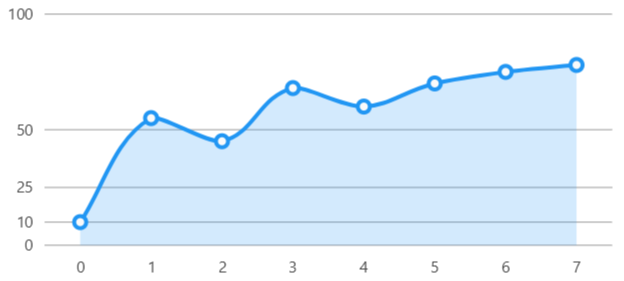
Custom Separators Interval
View model
using SkiaSharp;
using LiveChartsCore;
using LiveChartsCore.SkiaSharpView;
using LiveChartsCore.SkiaSharpView.Painting;
using LiveChartsCore.Kernel.Sketches;

namespace ViewModelsSamples.Axes.CustomSeparatorsInterval;

public class ViewModel
{
    public ISeries[] Series { get; set; } = [
        new LineSeries<int> { Values = [10, 55, 45, 68, 60, 70, 75, 78] }
    ];

    public ICartesianAxis[] YAxes { get; set; } = [
        new Axis
        {
            // We can specify a custom separator collection
            // the library will use this separators instead of
            // calculating them based on the date of the chart
            CustomSeparators = [0, 10, 25, 50, 100],
            MinLimit = 0, // forces the axis to start at 0
            MaxLimit = 100, // forces the axis to end at 100
            SeparatorsPaint = new SolidColorPaint(SKColors.Black.WithAlpha(100))
        }
    ];
}
LogarithmicPoint.cs
namespace ViewModelsSamples.Axes.Logarithmic;

public struct LogarithmicPoint
{
    public double X { get; set; }
    public double Y { get; set; }
}
HTML
@page "/Axes/CustomSeparatorsInterval"
@using LiveChartsCore.SkiaSharpView.Blazor
@using ViewModelsSamples.Axes.CustomSeparatorsInterval

<CartesianChart
	Series="ViewModel.Series"
	YAxes="ViewModel.YAxes">
</CartesianChart>

@code {
	public ViewModel ViewModel { get; set; } = new();
}
Articles you might also find useful: