Gaps/Null Points
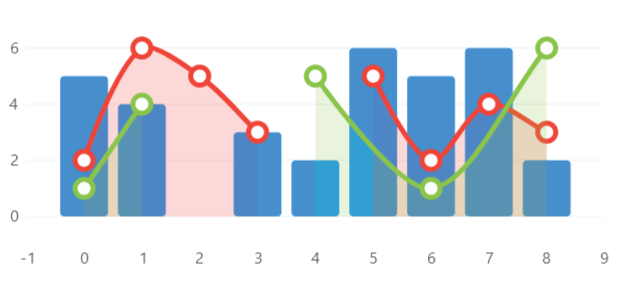

Hover over the image to see the chart animation
This sample uses C# 12 features, it also uses features from the CommunityToolkit.Mvvm package, you can learn more about it here.
View Model
using LiveChartsCore;
using LiveChartsCore.Defaults;
using LiveChartsCore.SkiaSharpView;

namespace ViewModelsSamples.General.NullPoints;

public class ViewModel
{
    public ISeries[] Series { get; set; } = [
        new ColumnSeries<double?>
        {
            Values = [5, 4, null, 3, 2, 6, 5, 6, 2]
        },
        new LineSeries<double?>
        {
            Values = [2, 6, 5, 3, null, 5, 2, 4, null]
        },
        new LineSeries<ObservablePoint?>
        {
            Values = [
                new ObservablePoint { X = 0, Y = 1 },
                new ObservablePoint { X = 1, Y = 4 },
                null,
                new ObservablePoint { X = 4, Y = 5 },
                new ObservablePoint { X = 6, Y = 1 },
                new ObservablePoint { X = 8, Y = 6 },
            ]
        }
    ];
}
XAML
<?xml version="1.0" encoding="utf-8" ?>
<ContentPage x:Class="MauiSample.General.NullPoints.View"
             xmlns="http://schemas.microsoft.com/dotnet/2021/maui"
             xmlns:x="http://schemas.microsoft.com/winfx/2009/xaml"
             xmlns:lvc="clr-namespace:LiveChartsCore.SkiaSharpView.Maui;assembly=LiveChartsCore.SkiaSharpView.Maui"
             xmlns:vms="clr-namespace:ViewModelsSamples.General.NullPoints;assembly=ViewModelsSamples"
             >
    <ContentPage.BindingContext>
        <vms:ViewModel/>
    </ContentPage.BindingContext>
	<ContentPage.Content>
        <Grid>
            <Grid.RowDefinitions>
                <RowDefinition Height="*"/>
            </Grid.RowDefinitions>

            <lvc:CartesianChart Series="{Binding Series}"></lvc:CartesianChart>

        </Grid>
    </ContentPage.Content>
</ContentPage>
