Outside Labels
This sample uses C# 13 preview features such as partial properties, it also uses features from the CommunityToolkit.Mvvm package, you can learn more about it here.
This web site wraps every sample using a UserControl instance, but LiveCharts controls can be used inside any container.
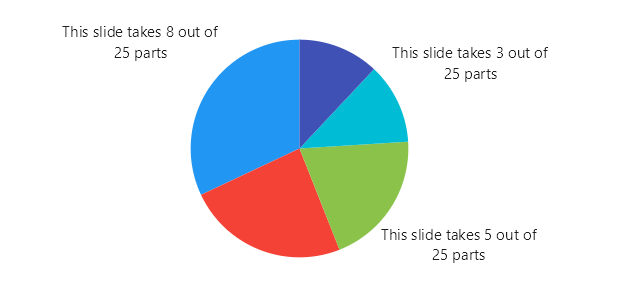
View model
using System;
using LiveChartsCore.Kernel;

namespace ViewModelsSamples.Pies.OutLabels;

public class PieData(string name, double value)
{
    public string Name { get; set; } = name;
    public double[] Values { get; set; } = [value];

    public Func<ChartPoint, string> LabelFormatter { get; set; } =
        point =>
            $"This slide takes {point.Coordinate.PrimaryValue} " +
            $"out of {point.StackedValue!.Total} parts";

    public Func<ChartPoint, string> TooltipFormatter { get; set; } =
        point =>
            $"{point.StackedValue!.Share:P2}";
}

public class ViewModel
{
    public PieData[] Data { get; set; } = [
        new("Maria",    8),
        new("Susan",    6),
        new("Charles",  5),
        new("Fiona",    3),
        new("George",   3)
    ];
}
XAML
<UserControl
    x:Class="WinUISample.Pies.OutLabels.View"
    xmlns="http://schemas.microsoft.com/winfx/2006/xaml/presentation"
    xmlns:x="http://schemas.microsoft.com/winfx/2006/xaml"
    xmlns:d="http://schemas.microsoft.com/expression/blend/2008"
    xmlns:mc="http://schemas.openxmlformats.org/markup-compatibility/2006"
    xmlns:lvc="using:LiveChartsCore.SkiaSharpView.WinUI"
    xmlns:vms="using:ViewModelsSamples.Pies.OutLabels"
    mc:Ignorable="d">

    <UserControl.DataContext>
        <vms:ViewModel/>
    </UserControl.DataContext>

    <lvc:PieChart
        IsClockwise="False"
        InitialRotation="-90"
        SeriesSource="{Binding Data}">
        <lvc:PieChart.SeriesTemplate>
            <DataTemplate>
                <lvc:XamlPieSeries
                    SeriesName="{Binding Name}"
                    Values="{Binding Values}"
                    DataLabelsFormatter="{Binding LabelFormatter}"
                    ToolTipLabelFormatter="{Binding TooltipFormatter}"
                    ShowDataLabels="True"
                    DataLabelsSize="15"
                    DataLabelsPosition="Outer"/>
            </DataTemplate>
        </lvc:PieChart.SeriesTemplate>
    </lvc:PieChart>

</UserControl>
