Logarithmic Scale
This web site builds the control from code behind but you could also grab it from the toolbox.
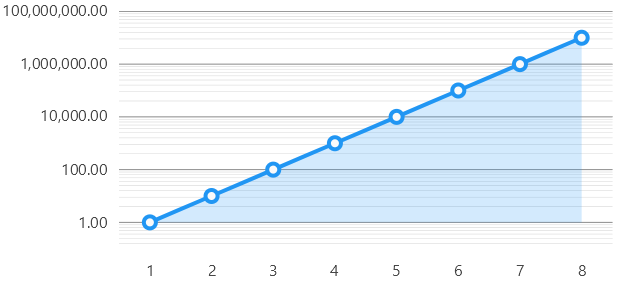
LogarithmicPoint.cs
namespace ViewModelsSamples.Axes.Logarithmic;

public class LogarithmicPoint(double x, double y)
{
    public double X { get; set; } = x;
    public double Y { get; set; } = y;
}
Code behind
using System;
using System.Windows.Forms;
using LiveChartsCore;
using LiveChartsCore.SkiaSharpView;
using LiveChartsCore.SkiaSharpView.Painting;
using LiveChartsCore.SkiaSharpView.WinForms;
using ViewModelsSamples.Axes.Logarithmic;

#pragma warning disable IDE1006 // Naming Styles

namespace WinFormsSample.Axes.Logarithmic;

public partial class View : UserControl
{
    private readonly CartesianChart cartesianChart;

    public View()
    {
        InitializeComponent();
        Size = new System.Drawing.Size(50, 50);

        var logBase = 10d;

        // register the logarithmic point mapper
        LiveCharts.Configure(config =>
            config.HasMap<LogarithmicPoint>(
                (logPoint, index) => new(logPoint.X, Math.Log(logPoint.Y, logBase))));

        var values = new LogarithmicPoint[]
        {
            new(1, 1),
            new(2, 10),
            new(3, 100),
            new(4, 1000),
            new(5, 10000),
            new(6, 100000),
            new(7, 1000000),
            new(8, 10000000)
        };

        var series = new ISeries[]
        {
            new LineSeries<LogarithmicPoint> { Values = values }
        };

        var yAxis = new LogarithmicAxis(logBase)
        {
            SeparatorsPaint = new SolidColorPaint(SkiaSharp.SKColors.LightSlateGray),
            SubseparatorsPaint = new SolidColorPaint(SkiaSharp.SKColors.LightSlateGray) { StrokeThickness = 0.5f },
            SubseparatorsCount = 9
        };

        cartesianChart = new CartesianChart
        {
            Series = series,
            YAxes = [yAxis],
            Location = new System.Drawing.Point(0, 0),
            Size = new System.Drawing.Size(50, 50),
            Anchor = AnchorStyles.Left | AnchorStyles.Right | AnchorStyles.Top | AnchorStyles.Bottom
        };

        Controls.Add(cartesianChart);
    }
}
