Custom Separators Interval
This web site builds the control from code behind but you could also grab it from the toolbox, this sample also uses a ViewModel to populate the properties of the control(s) in this sample.
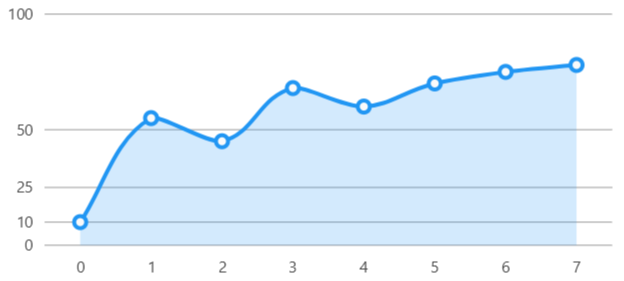
Code behind
using System;
using System.Windows.Forms;
using LiveChartsCore;
using LiveChartsCore.SkiaSharpView;
using LiveChartsCore.SkiaSharpView.WinForms;

#pragma warning disable IDE1006 // Naming Styles

namespace WinFormsSample.Axes.CustomSeparatorsInterval;

public partial class View : UserControl
{
    private readonly CartesianChart cartesianChart;

    public View()
    {
        InitializeComponent();
        Size = new System.Drawing.Size(50, 50);

        var values = new int[] { 10, 55, 45, 68, 60, 70, 75, 78 };
        var customSeparators = new double[] { 0, 10, 25, 50, 100 };

        var series = new ISeries[]
        {
            new LineSeries<int> { Values = values }
        };

        var yAxis = new Axis
        {
            CustomSeparators = customSeparators
        };

        cartesianChart = new CartesianChart
        {
            Series = series,
            YAxes = [yAxis],
            Location = new System.Drawing.Point(0, 0),
            Size = new System.Drawing.Size(50, 50),
            Anchor = AnchorStyles.Left | AnchorStyles.Right | AnchorStyles.Top | AnchorStyles.Bottom
        };

        Controls.Add(cartesianChart);
    }
}
