Line Geometries
This web site builds the control from code behind but you could also grab it from the toolbox.
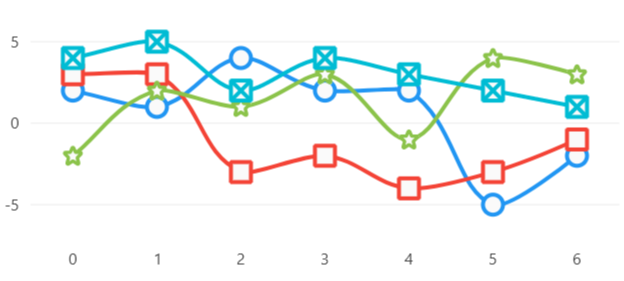
MyGeometry.cs
using LiveChartsCore.Drawing; using LiveChartsCore.SkiaSharpView.Drawing;
namespace ViewModelsSamples.Lines.Custom;
public class MyGeometry : BoundedDrawnGeometry, IDrawnElement
    canvas.DrawRect(X, Y, Width, Height, paint);
    canvas.DrawLine(X, Y, X + Width, Y + Height, paint);
    canvas.DrawLine(X + Width, Y, X, Y + Height, paint);
}
}
Code behind```
using System.Windows.Forms; using LiveChartsCore.SkiaSharpView.WinForms; using LiveChartsCore.SkiaSharpView; using LiveChartsCore; using LiveChartsCore.SkiaSharpView.Drawing.Geometries; using LiveChartsCore.SkiaSharpView.Painting; using SkiaSharp; using ViewModelsSamples.Lines.Custom; using LiveChartsCore.Drawing;
namespace WinFormsSample.Lines.Custom;
public partial class View : UserControl { public View() { Size = new System.Drawing.Size(50, 50);
    var values1 = new double[] { 2, 1, 4, 2, 2, -5, -2 };
    var values2 = new double[] { 3, 3, -3, -2, -4, -3, -1 };
    var values3 = new double[] { -2, 2, 1, 3, -1, 4, 3 };
    var values4 = new double[] { 4, 5, 2, 4, 3, 2, 1 };
    var pinPath = SVGPoints.Pin;

    var series = new ISeries[]
    {
        new LineSeries<double>
        {
            Values = values1,
            Fill = null,
            GeometrySize = 20
        },

        // the second type argument is the geometry type
        // there are many built-in geometries available at the
        // LiveChartsCore.SkiaSharpView.Drawing.Geometries namespace.
        new LineSeries<double, StarGeometry>
        {
            Values = values2,
            Fill = null,
            GeometrySize = 20
        },

        // the variable SVG path geometry allows you to
        // change the SVG path at runtime, this has a performance penalty.
        new LineSeries<double, VariableSVGPathGeometry>
        {
            Values = values3,
            Fill = null,
            GeometrySize = 20,
            GeometrySvg = pinPath
        },

        // finally, you can create your own custom geometry
        // using skiasharp.
        new LineSeries<double, MyGeometry>
        {
            Values = values4,
            Fill = null,
            GeometrySize = 20
        }
    };

    var cartesianChart = new CartesianChart
    {
        Series = series,
        Location = new System.Drawing.Point(0, 0),
        Size = new System.Drawing.Size(50, 50),
        Anchor = AnchorStyles.Left | AnchorStyles.Right | AnchorStyles.Top | AnchorStyles.Bottom
    };

    Controls.Add(cartesianChart);
}
}
<!--
To get help on editing this file, see https://github.com/beto-rodriguez/LiveCharts2/blob/dev/docs/readme.md
content is normally pulled from the examples in the repository.
-->


<span style="opacity: 0.7"> Related articles: </span>


<div>
    <a href="https://livecharts.dev/docs/winforms/2.0.0/CartesianChart.Cartesian%20chart%20control">
        <b>- Cartesian chart control</b>
    </a>
</div>

<div>
    <a href="https://livecharts.dev/docs/winforms/2.0.0/CartesianChart.Line%20Series%20properties">
        <b>- Line series properties</b>
    </a>
</div>


<div id="edit-this-article-source">
    ~/samples/lines/custom/template.md
</div>
