Axis Labels
This sample uses C# 13 preview features such as partial properties, it also uses features from the CommunityToolkit.Mvvm package, you can learn more about it here.
This web site wraps every sample using a UserControl instance, but LiveCharts controls can be used inside any container.
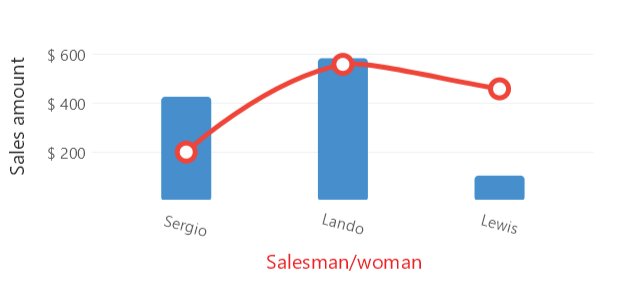
View model
using System;

namespace ViewModelsSamples.Axes.LabelsFormat;

public class ViewModel
{
    public double[] Values1 { get; set; } =
        [426, 583, 104];

    public double[] Values2 { get; set; } =
        [200, 558, 458];

    public string[] Labels { get; set; } =
        ["Sergio", "Lando", "Lewis"];

    public Func<double, string> Labeler { get; set; } =
        value => value.ToString("C2");
}
XAML
<UserControl
    x:Class="WinUISample.Axes.LabelsFormat.View"
    xmlns="http://schemas.microsoft.com/winfx/2006/xaml/presentation"
    xmlns:x="http://schemas.microsoft.com/winfx/2006/xaml"
    xmlns:d="http://schemas.microsoft.com/expression/blend/2008"
    xmlns:mc="http://schemas.openxmlformats.org/markup-compatibility/2006"
    xmlns:lvc="using:LiveChartsCore.SkiaSharpView.WinUI"
    xmlns:vms="using:ViewModelsSamples.Axes.LabelsFormat"
    mc:Ignorable="d">

    <UserControl.DataContext>
        <vms:ViewModel/>
    </UserControl.DataContext>

    <lvc:CartesianChart>

        <lvc:CartesianChart.Series>
            <lvc:SeriesCollection>
                <lvc:XamlColumnSeries
                    Values="{Binding Values1}"/>
                    <lvc:XamlColumnSeries
                    Values="{Binding Values2}"
                    Fill="{x:Null}"/>
            </lvc:SeriesCollection>
        </lvc:CartesianChart.Series>

        <lvc:CartesianChart.XAxes>
            <lvc:AxesCollection>
                <lvc:XamlAxis
                    AxisName="Salesman/woman"
                    Labels="{Binding Labels}"/>
            </lvc:AxesCollection>
        </lvc:CartesianChart.XAxes>

        <lvc:CartesianChart.YAxes>
            <lvc:AxesCollection>
                <lvc:XamlAxis
                    AxisName="Sales"
                    NamePadding="{lvc:Padding Value='0,15'}"
                    Labeler="{Binding Labeler}"
                    LabelsPaint="{lvc:SolidColorPaint
                        Color='#00f',
                        FontFamily='Times New Roman',
                        FontWeight=ExtraBold,
                        FontWidth=Normal,
                        FontSlant=Italic}"/>
            </lvc:AxesCollection>
        </lvc:CartesianChart.YAxes>

    </lvc:CartesianChart>
</UserControl>
