Bars Background
This sample uses C# 13 preview features such as partial properties, it also uses features from the CommunityToolkit.Mvvm package, you can learn more about it here.
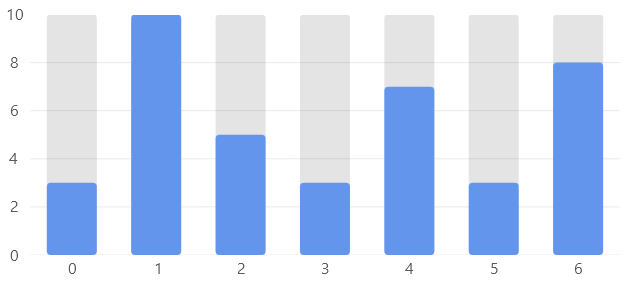
View Model
namespace ViewModelsSamples.Bars.WithBackground;

public class ViewModel
{
    public double[] Values1 { get; set; } =
        [20, 50, 40, 20, 40, 30, 50, 20, 50, 40];

    public double[] Values2 { get; set; } =
        [3, 10, 5, 3, 7, 3, 8];
}
XAML
<UserControl
    x:Class="WinUISample.Bars.WithBackground.View"
    xmlns="http://schemas.microsoft.com/winfx/2006/xaml/presentation"
    xmlns:x="http://schemas.microsoft.com/winfx/2006/xaml"
    xmlns:d="http://schemas.microsoft.com/expression/blend/2008"
    xmlns:mc="http://schemas.openxmlformats.org/markup-compatibility/2006"
    xmlns:lvc="using:LiveChartsCore.SkiaSharpView.WinUI"
    xmlns:vms="using:ViewModelsSamples.Bars.WithBackground"
    mc:Ignorable="d">

    <UserControl.DataContext>
        <vms:ViewModel/>
    </UserControl.DataContext>

    <!--
    When the bar positon is ignored, all bars are drawn in the same position.
    The first series is the background, we force the bar size to 10 in the values scale
    -->

    <lvc:CartesianChart>

        <lvc:CartesianChart.Series>
            <lvc:SeriesCollection>
                <lvc:XamlColumnSeries
                    IsHoverable="False"
                    Values="{Binding Values1}"
                    Fill="{lvc:SolidColorPaint Color='#32b4b4b4'}"
                    IgnoresBarPosition="True"/>
                <lvc:XamlColumnSeries
                    Values="{Binding Values2}"
                    IgnoresBarPosition="True"/>
            </lvc:SeriesCollection>
        </lvc:CartesianChart.Series>

        <lvc:CartesianChart.YAxes>
            <lvc:AxesCollection>
                <lvc:XamlAxis
                    MinLimit="0"
                    MaxLimit="10"/>
            </lvc:AxesCollection>
        </lvc:CartesianChart.YAxes>

    </lvc:CartesianChart>

</UserControl>
