Paints
A Paint
is an object that paints graphical objects in the user interface. It is similar to the Brushes class for
AvaloniaUI or WPF. LiveCharts defines its own class, which is optimized for the library's use case.
Currently the only official backend for LiveCharts is based on SkiaSharp. That means that
you can use any SkiaSharp feature to render a chart. If you are familiar with SkiaSharp, you might know that there is also an
object called Paint. The LiveCharts Paint is a wrapper for the SkiaSharp Paint, but it adds some features such as animations and
has an API that feels more like WPF. It should feel easier to manipulate a LiveCharts Paint from the perspective of a front-end developer.
There are some paints already defined in the library such as the SolidColorPaint, the LinearGradientPaint, or the RadialGradientPaint but you could also implement your own.
You can assign a paint to a series (Fill and Stroke properties) and axes (DataLabelsPaint and SeparatorPaint properties) normally
to indicate how things will render in the user interface. Take a look at the following samples:
Null paint
null is a valid value for the IPaint<T> type, it means that the visual will be ignored or not drawn in the UI.
Solid color
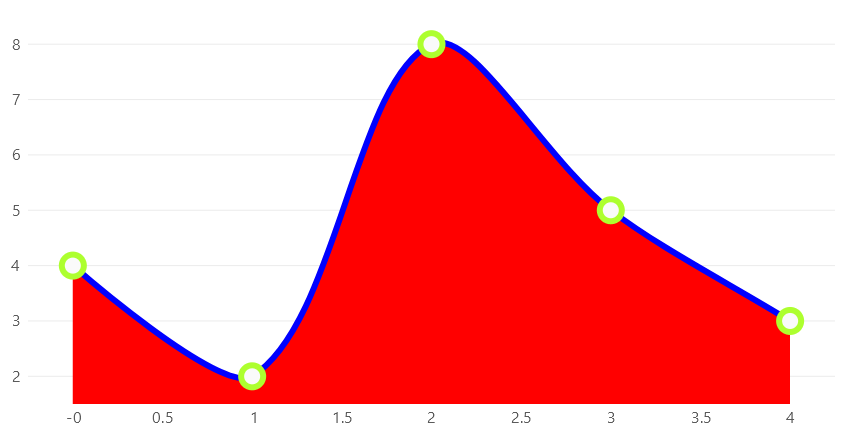
new LineSeries<int>
{
    Values = new []{ 4, 2, 8, 5, 3 },
    GeometrySize = 22,
    Fill = new SolidColorPaint(SKColors.Red),
    Stroke = new SolidColorPaint(SKColors.Blue) { StrokeThickness = 6 },
    GeometryStroke = new SolidColorPaint(SKColors.GreenYellow) { StrokeThickness = 6 }
}
Linear gradient
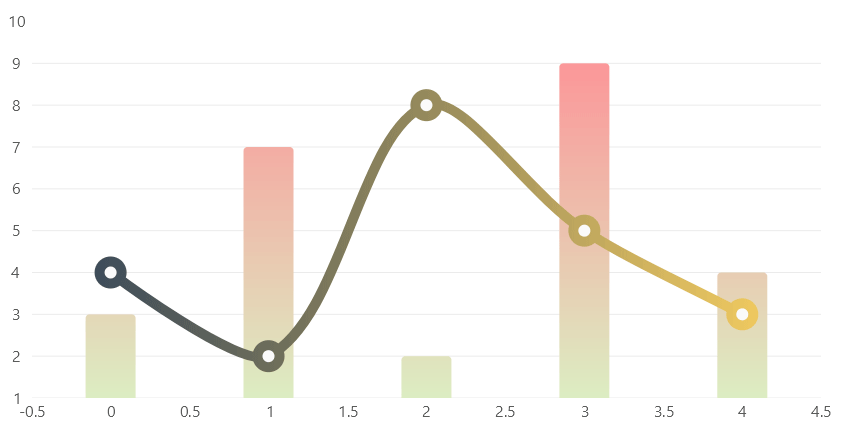
// linear gradients are based on SkiaSharp linear gradients
// for more info please see:
// https://docs.microsoft.com/en-us/xamarin/xamarin-forms/user-interface/graphics/skiasharp/effects/shaders/linear-gradient

var colors = new[]
{
    new SKColor(45, 64, 89),
    new SKColor(255, 212, 96)
    // ...

    // you can add as many colors as you require to build the gradient
    // by default all the distance between each color is equal
    // use the colorPos parameter in the constructor of the LinearGradientPaint class
    // to specify the distance between each color
};

Series = new ISeries[]
{
    new ColumnSeries<int>
    {
        Values = new []{ 3, 7, 2, 9, 4 },
        Stroke = null,

        // this is an easy way to set a linear gradient:
        // Fill = new LinearGradientPaint(new SKColor(255, 140, 148), new SKColor(220, 237, 194))

        // but you can customize the gradient
        Fill = new LinearGradientPaint(
            // the gradient will use the following colors array
            new [] { new SKColor(255, 140, 148), new SKColor(220, 237, 194) },

            // now with the following points we are specifying the orientation of the gradient.
            // By default the gradient is oriented horizontally,
            // defined by the points: (0, 0.5) and (1, 0.5).
            // But for this sample we will use a vertical gradient:

            // to build a vertical gradient we must specify 2 points that will draw an imaginary line.
            // The gradient will interpolate colors linearly as it moves following this imaginary line.
            // The coordinates of these points (X, Y) go from 0 to 1,
            // where 0 is the start of the axis and 1 is the end. Then to build our vertical gradient

            // we must go from the point:
            // (x0, y0) where x0 could be read as "the middle of the x axis" (0.5) and y0 as "the start of the y axis" (0)
            new SKPoint(0.5f, 0),

            // to the point:
            // (x1, y1) where x1 could be read as "the middle of the x axis" (0.5) and y0 as "the end of the y axis" (1)
            new SKPoint(0.5f, 1))
    },
    new LineSeries<int>
    {
        Values = new []{ 4, 2, 8, 5, 3 },
        GeometrySize = 22,
        Stroke = new LinearGradientPaint(colors) { StrokeThickness = 10 },
        GeometryStroke = new LinearGradientPaint(colors) { StrokeThickness = 10 },
        Fill = null
    }
};
Radial gradient

// radial gradients are based on SkiaSharp circular gradients
// for more info please see:
// https://docs.microsoft.com/en-us/xamarin/xamarin-forms/user-interface/graphics/skiasharp/effects/shaders/circular-gradients

var colors = new[]
{
    new SKColor(179, 229, 252),
    new SKColor(1, 87, 155)
    // ...

    // you can add as many colors as you require to build the gradient
    // by default all the distance between each color is equal
    // use the colorPos parameter in the constructor of the RadialGradientPaint class
    // to specify the distance between each color
};

Series = new ISeries[]
{
    new PieSeries<int>
    {
        Values = new []{ 7 },
        Stroke = null,
        Fill = new RadialGradientPaint(colors),
        Pushout = 10
    },
    new PieSeries<int>
    {
        Values = new []{ 3 },
        Stroke = null,
        Fill = new RadialGradientPaint(new SKColor(255, 205, 210), new SKColor(183, 28, 28))
    }
};

<div id="edit-this-article-source">
    ~/overview/1.6.paint tasks.md
</div>
