Custom Separators Interval
This sample uses C# 13 preview features such as partial properties, it also uses features from the CommunityToolkit.Mvvm package, you can learn more about it here.
This web site wraps every sample using a ContentPage instance, but LiveCharts controls can be used inside any container.
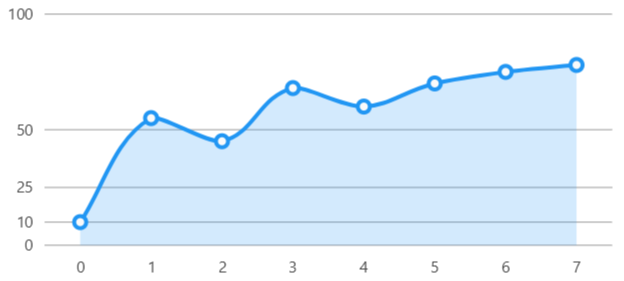
View model
namespace ViewModelsSamples.Axes.CustomSeparatorsInterval;

public class ViewModel
{
    public int[] Values { get; set; } =
        [10, 55, 45, 68, 60, 70, 75, 78];

    public double[] CustomSeparators { get; set; } =
        [0, 10, 25, 50, 100];
}
XAML
<?xml version="1.0" encoding="utf-8" ?>
<ContentPage
    x:Class="MauiSample.Axes.CustomSeparatorsInterval.View"
    xmlns="http://schemas.microsoft.com/dotnet/2021/maui"
    xmlns:x="http://schemas.microsoft.com/winfx/2009/xaml"
    xmlns:lvc="clr-namespace:LiveChartsCore.SkiaSharpView.Maui;assembly=LiveChartsCore.SkiaSharpView.Maui"
    xmlns:vms="clr-namespace:ViewModelsSamples.Axes.CustomSeparatorsInterval;assembly=ViewModelsSamples"
    x:DataType="vms:ViewModel">

    <ContentPage.BindingContext>
        <vms:ViewModel/>
    </ContentPage.BindingContext>

    <lvc:CartesianChart>

        <lvc:CartesianChart.Series>
            <lvc:SeriesCollection>
                <lvc:XamlLineSeries Values="{Binding Values}"/>
            </lvc:SeriesCollection>
        </lvc:CartesianChart.Series>

        <lvc:CartesianChart.YAxes>
            <lvc:AxesCollection>
                <lvc:XamlAxis
                    CustomSeparators="{Binding CustomSeparators}"
                    MinLimit="0"
                    MaxLimit="100"
                    SeparatorsPaint="#64b4b4b4"/>
            </lvc:AxesCollection>
        </lvc:CartesianChart.YAxes>

    </lvc:CartesianChart>
</ContentPage>
