Date Time Scale
This web site builds the control from code behind but you could also grab it from the toolbox, this sample also uses a ViewModel to populate the properties of the control(s) in this sample.
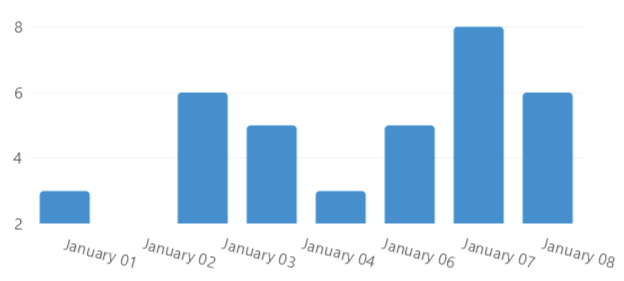
View model
using System;
using LiveChartsCore;
using LiveChartsCore.Defaults;
using LiveChartsCore.Kernel.Sketches;
using LiveChartsCore.SkiaSharpView;

namespace ViewModelsSamples.Axes.DateTimeScaled;

public class ViewModel
{
    public ISeries[] Series { get; set; } = [
        new ColumnSeries<DateTimePoint>
        {
            Values = [
                new() { DateTime = new(2021, 1, 1), Value = 3 },
                new() { DateTime = new(2021, 1, 2), Value = 6 },
                new() { DateTime = new(2021, 1, 3), Value = 5 },
                new() { DateTime = new(2021, 1, 4), Value = 3 },
                new() { DateTime = new(2021, 1, 5), Value = 5 },
                new() { DateTime = new(2021, 1, 6), Value = 8 },
                new() { DateTime = new(2021, 1, 7), Value = 6 }
            ]
        }
    ];

    // You can use the DateTimeAxis class to define a date time based axis // mark

    // The first parameter is the time between each point, in this case 1 day // mark
    // you can also use 1 year, 1 month, 1 hour, 1 minute, 1 second, 1 millisecond, etc // mark

    // The second parameter is a function that receives a date and returns the label as string // mark
    public ICartesianAxis[] XAxes { get; set; } = [
        new DateTimeAxis(TimeSpan.FromDays(1), date => date.ToString("MMMM dd"))
    ];
}
Form code behind
using System.Windows.Forms;
using LiveChartsCore.SkiaSharpView.WinForms;
using ViewModelsSamples.Axes.DateTimeScaled;

namespace WinFormsSample.Axes.DateTimeScaled;

public partial class View : UserControl
{
    private readonly CartesianChart cartesianChart;

    public View()
    {
        InitializeComponent();
        Size = new System.Drawing.Size(50, 50);

        var viewModel = new ViewModel();

        cartesianChart = new CartesianChart
        {
            Series = viewModel.Series,
            XAxes = viewModel.XAxes,

            // out of livecharts properties...
            Location = new System.Drawing.Point(0, 0),
            Size = new System.Drawing.Size(50, 50),
            Anchor = AnchorStyles.Left | AnchorStyles.Right | AnchorStyles.Top | AnchorStyles.Bottom
        };

        Controls.Add(cartesianChart);
    }
}
