Outside Labels
This web site builds the control from code behind but you could also grab it from the toolbox.
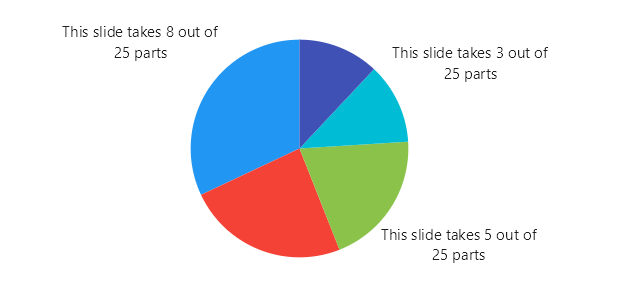
Code behind
using System.Windows.Forms;
using LiveChartsCore.SkiaSharpView.Extensions;
using LiveChartsCore.SkiaSharpView.Painting;
using LiveChartsCore.SkiaSharpView.WinForms;
using SkiaSharp;

namespace WinFormsSample.Pies.OutLabels;

public partial class View : UserControl
{
    private readonly PieChart pieChart;

    public View()
    {
        InitializeComponent();
        Size = new System.Drawing.Size(50, 50);

        var index = 0;
        string[] names = ["Maria", "Susan", "Charles", "Fiona", "George"];

        pieChart = new PieChart
        {
            Series = new[] { 8, 6, 5, 3, 3 }.AsPieSeries((value, series) =>
            {
                series.Name = names[index++ % names.Length];
                series.DataLabelsPosition = LiveChartsCore.Measure.PolarLabelsPosition.Outer;
                series.DataLabelsSize = 15;
                series.DataLabelsPaint = new SolidColorPaint(new SKColor(30, 30, 30));
                series.DataLabelsFormatter =
                   point =>
                       $"This slide takes {point.Coordinate.PrimaryValue} " +
                       $"out of {point.StackedValue!.Total} parts";
                series.ToolTipLabelFormatter = point => $"{point.StackedValue!.Share:P2}";
            }),
            IsClockwise = false,
            InitialRotation = -90,
            Location = new System.Drawing.Point(0, 0),
            Size = new System.Drawing.Size(50, 50),
            Anchor = AnchorStyles.Left | AnchorStyles.Right | AnchorStyles.Top | AnchorStyles.Bottom
        };

        Controls.Add(pieChart);
    }
}
