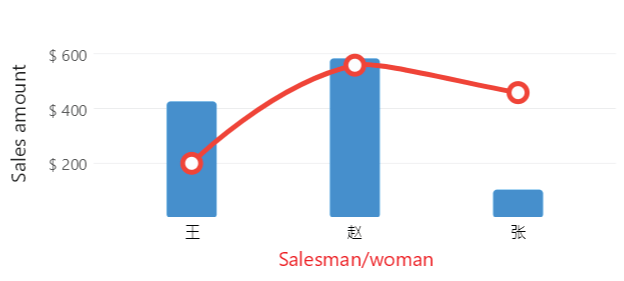
Chinease, Japanese, Arabic, Russian
Razor
@page "/Axes/LabelsFormat2"
@using LiveChartsCore.SkiaSharpView.Blazor
@using LiveChartsCore;
@using LiveChartsCore.SkiaSharpView;
@using LiveChartsCore.SkiaSharpView.Painting;
@using SkiaSharp;

<CartesianChart Series="@series"
                XAxes="@xAxes"
                YAxes="@yAxes">
</CartesianChart>

@code {
    private static double[] values1 = new double[] { 426, 583, 104 };
    private static double[] values2 = new double[] { 200, 558, 458 };
    private static string[] labels = new string[] { "王", "赵", "张" };
    private static string Labeler(double value) => value.ToString("C2");

    private ISeries[] series = new ISeries[]
    {
        new ColumnSeries<double> { Values = values1 },
        new ColumnSeries<double> { Values = values2, Fill = null }
    };

    private Axis[] xAxes = new Axis[]
    {
        new Axis
        {
            Name = "姓名",
            Labels = labels
        }
    };

    private Axis[] yAxes = new Axis[]
    {
        new Axis
        {
            Name = "销售额",
            NamePadding = new LiveChartsCore.Drawing.Padding(0, 15),
            Labeler = Labeler,
            LabelsPaint = new SolidColorPaint(SKColors.DarkGreen)
        }
    };

    // protected override async Task OnInitializedAsync()
    // {
        // Register a font that supports Chinese characters (optional, for full compatibility)
        // this must be defined when the app starts not here... this is just an example,
        // see App.razor.cs for a better place to do this

        // we need to load a font that supports Chinese characters
        // for example the Source Han Sans CN Light.otf, that is in the wwwroot folder
        // https://github.com/beto-rodriguez/LiveCharts2/tree/master/samples/BlazorSample

        // var httpClient = new HttpClient { BaseAddress = new("https://localhost:7277") };
        // var fontStream = await httpClient.GetStreamAsync("Source Han Sans CN Light.otf");
        // var typeface = SKTypeface.FromStream(fontStream);

        // LiveCharts.Configure(config =>
        //     config.HasTextSettings(new TextSettings
        //     {
        //         DefaultTypeface = typeface
        //     }));
    // }
}
Articles you might also find useful: