Line Geometries
This sample uses C# 13 preview features such as partial properties, it also uses features from the CommunityToolkit.Mvvm package, you can learn more about it here.
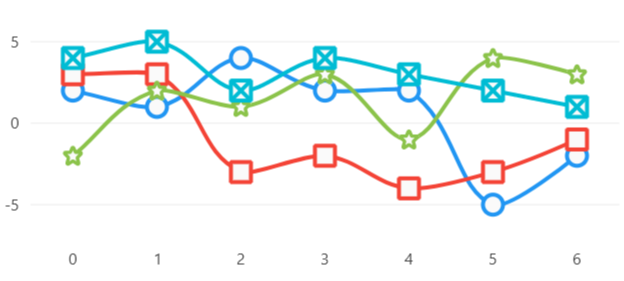
View model
using LiveChartsCore.Drawing;

namespace ViewModelsSamples.Lines.Custom;

public class ViewModel
{
    public double[] Values1 { get; set; } =
        [2, 1, 4, 2, 2, -5, -2];

    public double[] Values2 { get; set; } =
        [3, 3, -3, -2, -4, -3, -1];

    public double[] Values3 { get; set; } =
        [-2, 2, 1, 3, -1, 4, 3];

    public double[] Values4 { get; set; } =
        [4, 5, 2, 4, 3, 2, 1];

    public string PinPath { get; set; } =
        SVGPoints.Pin;
}
MyGeometry.cs
using LiveChartsCore.Drawing; using LiveChartsCore.SkiaSharpView.Drawing;
namespace ViewModelsSamples.Lines.Custom;
public class MyGeometry : BoundedDrawnGeometry, IDrawnElement
    canvas.DrawRect(X, Y, Width, Height, paint);
    canvas.DrawLine(X, Y, X + Width, Y + Height, paint);
    canvas.DrawLine(X + Width, Y, X, Y + Height, paint);
}
}
XAML```
<ContentPage.BindingContext>
    <vms:ViewModel/>
</ContentPage.BindingContext>

<lvc:CartesianChart>
    <lvc:CartesianChart.Series>
        <lvc:SeriesCollection>
            <lvc:XamlLineSeries
                Values="{Binding Values1}"
                Fill="{x:Null}"
                GeometrySize="20"/>

            <!--
            Use the generic type arguments to set the type of the geometry to draw,
            here are many predefined geometries in the LiveChartsCore.SkiaSharpView.Drawing.Geometries
            namespace, for example, the StarGeometry, CrossGeometry, RectangleGeometry and DiamondGeometry

            The first type argument is the type of data, in this case double (parsed from the values string).
            The second type argument is the type of geometry to draw.
            -->
            <lvc:XamlLineSeries
                x:TypeArguments="x:Double, draw:StarGeometry"
                Values="{Binding Values2}"
                Fill="{x:Null}"
                GeometrySize="20" />

            <!--
            You can also use SVG paths to draw the geometry
            the VariableSVGPathGeometry can change the drawn path at runtime
            -->
            <lvc:XamlLineSeries
                x:TypeArguments="x:Double, draw:VariableSVGPathGeometry"
                GeometrySvg="{Binding PinPath}"
                Values="{Binding Values3}"
                Fill="{x:Null}"
                GeometrySize="20"/>

            <!--
            Finally you can also use SkiaSharp to draw your own geometry
            -->
            <lvc:XamlLineSeries
                x:TypeArguments="x:Double, vms:MyGeometry"
                Values="{Binding Values4}"
                Fill="{x:Null}"
                GeometrySize="20"/>
        </lvc:SeriesCollection>
    </lvc:CartesianChart.Series>
</lvc:CartesianChart>
<!--
To get help on editing this file, see https://github.com/beto-rodriguez/LiveCharts2/blob/dev/docs/readme.md
content is normally pulled from the examples in the repository.
-->


<span style="opacity: 0.7"> Related articles: </span>


<div>
    <a href="https://livecharts.dev/docs/maui/2.0.0/CartesianChart.Cartesian%20chart%20control">
        <b>- Cartesian chart control</b>
    </a>
</div>

<div>
    <a href="https://livecharts.dev/docs/maui/2.0.0/CartesianChart.Line%20Series%20properties">
        <b>- Line series properties</b>
    </a>
</div>


<div id="edit-this-article-source">
    ~/samples/lines/custom/template.md
</div>
